Put an end to your ISP tracking your habits

Are you concerned about your digital footprint? Does it bother you that anyone listening can observe which websites you visit? Most people don’t know what DNS is or how much information it leaks. I’ll share with you what the problem is and how to fortify yourself against snoopers.

DNS (Domain Name System) is the backbone of the internet. Without it, browser requests would not resolve a domain name (e.g., crabradio.net) to an IP address. That’s essential, because the fundamental principles of routing traffic depend upon numbers (IP addresses). However, the designers of DNS did not consider privacy (or security). Consequently, it leaks every website you visit, which mail servers you use, and sometimes a lot more. A snooper can build substantial profiles on all of us, and they do. There is one saving grace, and there’s slow-moving progress in the right direction. Today, I have a solution that’s different from the rest.

This video does an excellent job of explaining how DNS works:  DNS video but, if you already have a decent understanding of Domain Name System, you may wish to skip watching it.

You can see queries do not stop at your DNS server (aka recursive resolver). Further requests occur upstream, incrementally resolving them until they reach the “authoritative nameserver,” which handles domains it controls (called a DNS zone). We will cover the last mile today, the part between your OS (aka stub resolver) and the recursive resolver.

The “last mile” is a term used in telecommunication (from the service provider’s perspective) to describe the last leg between the system and the end-user. Conversely, the (unofficial) term “upstream” refers to all the other links (between the resolver and the nameservers). These words sound awkward together, so they’re worth an explanation.

The biggest problem with DNS is that the request between the stub resolver (in your OS) and the recursive resolver is unencrypted. These packets contain information about where you shop, where you bank, what times you’re awake, and what you like, watch, and think, and when you do it. Your traffic pattern is so unique that it can fingerprint and track you across networks. So, if you use a VPN, your DNS requests act as a shining beacon, uniquely identifying you. This can occur even with encrypted queries.


Typical DNS requests also take place over connectionless UDP, which does not ensure packet stream integrity. Couple that with a lack of encryption, and they’re alarmingly easy to intercept and manipulate. In fact, it’s common practice for your ISP to do so, forwarding them to their own resolvers or modifying the response. So, if you think you’re using Cloudflare’s DNS, think again. Mass censorship systems also use such tactics: The Great Firewall of China uses deep packet inspection and DNS injection to reroute queries.

It’s important to realize that your DNS requests may traverse many jurisdictions, and often countries and organizations don’t share the same values as you. While some may have ideological differences, others have commercial intent. That’s not limited to foreign countries either. It’s well known that Comcast once redirected its customers to ad-laden web pages upon nonexistent domain (NXDOMAIN) errors.

While you may have nothing to hide, your DNS requests are being intercepted and redirected, which makes you vulnerable to social manipulation and commercial profiling. I don’t know about you, but the unregulated interception of my packets is deeply unsettling.

We’ve established that unencrypted DNS queries leave them open to interpretation and manipulation, and the strongest solution is always encryption. There are a couple of solutions to do this, with DNS-over-TLS (DoT) and DNS-over-HTTPS (DoH) being two. While good and often recommended, they don’t offer the additional features that DNSCrypt does. The DNSCrypt client site is HERE.

DNSCrypt is my go-to choice because it encrypts and pads your queries. Padding is crucial because upstream packets get decrypted, and a snooper with significant resources (such as an ISP) can correlate the encrypted and unencrypted packets by size and timing, making encryption meaningless. Both DoT and DoH have sparse support for it, so it’s often unused. DNSCrypt makes this feature mandatory, so all your packets are resilient against traffic analysis and correlation.

However, it’s the additional relay feature that seals the deal for me. When requested, DNSCrypt will send your encrypted requests through an intermediary (the relay). It can’t read the data, but it knows who made the request. When it forwards the packets, upstream only sees the relay making the request and the request data—which means they know nothing about you.

So DNSCrypt encrypts, pads, and routes your queries through a relay. All three make DNSCrypt the best choice for protecting your privacy.

Awhile back, I made a post that showed you how to configure a linksys 1900acs router with NordVPN on it.  The post is HERE, if you wish to review it.

If you are using dd-wrt firmware, it’s easy to enable DNSCrypt. Just go to Services>Services and set DNSMasq and DNSCrypt to ON. Ensure that “Use DNSMasq for DHCP” and “Use DNSMasq for DNS” are checked in your DD-WRT settings to prevent DNS leaks.

I mentioned earlier that even using a VPN that your DNS requests are like a shining beacon…. This is not entirely true, if you are using NordVPN as I do. When NordVPN is active via OpenVPN, it typically routes all DNS traffic through its own encrypted tunnels as long as you set it up that way to not use the ISP DNS Servers  (NordVPN’s DNS servers: 103.86.96.100 and 103.86.99.100). Running DNSCrypt simultaneously means you are encrypting queries that are already being encrypted by the VPN, which is redundant.

So, the moral of the story is that if you aren’t using a VPN with it’s own secure DNS Servers, you should probably set up DNSCrypt to insure your privacy, at a minimum, but, running both would gain you nothing except injecting more latency.  And, if you have a choice, NordVPN would be the better choice, as not only is the DNS traffic encrypted, but so is all of your traffic, because it is all contained in the encrypted tunnel, thereby shielding not only your browsing habits from your ISP and snoopers, but all of your data as well.

Hope that this was all understandable, and sorry for the length, but it’s a very large topic. And, if anyone has any questions y’all know how to reach me.  😉



2025 KRAB music update

Happy New Year, everybody! O si lo preferís, ¡Feliz Año Nuevo! Oder, falls Sie es etwas ungern mögen: Frohes Neues Jahr. It’s that time of year again for the large end of year KRAB update. It’s about 42.5 GB of new music.
This year, there are 2025 releases from the following artists:
38 Special
Alice Cooper
Glen Hughes
Helloween
Styx
The Offspring
The Who
I also finally got around to adding a whole load of Grateful Dead for you Dead Heads out there.
This year, as usual, there is a good assortment of artists that are new to KRAB.
This year, I also am replacing a couple catalogs with better quality and/or better cover art albums.
Unfortunately, this year, there are no new bootlegs being added. I couldn’t seem to find any good ones that I already didn’t have. However, I shall try a bit harder next year.
I had thought that I had already put The Who on KRAB, but couldn’t seem to find any, so y’all got them now.
I also noticed that for some reason, the Lou Reed catalog was ‘request only’. I have fixed this, so now he will appear in the playlist.
I do apologize as this year, I forgot to add the Christmas music randomly playing  every so often and I will try to set that up next year. I guess I had too many irons in the fire this year.
These new additions should be in KRAB’s playlist by the time that you are reading this, and will also be listed in the NEW category on the webpage in order for you to easily find them for your listening pleasure.
What follows, is the itemized album listing that has been uploaded:

38 Special – 2025 – Milestone
Alice Cooper – 2008 – Along Came A Spider
Alice Cooper – 2010 – Theatre Of Death, Live at Hammersmith 2009
Alice Cooper – 2011 – Old School, 1964-1974
Alice Cooper – 2011 – Welcome 2 My Nightmare
Alice Cooper – 2012 – No More Mr. Nice Guy. Live!
Alice Cooper – 2014 – Raise The Dead Live From Wacken
Alice Cooper – 2017 – Paranormal
Alice Cooper – 2018 – A Paranormal Evening At The Olympia Paris
Alice Cooper – 2021 – Detroit Stories
Alice Cooper – 2025 – The Revenge Of Alice Cooper
Alice Cooper – 2008 – Along Came A Spider
Alice Cooper – 2010 – Theatre Of Death, Live at Hammersmith 2009
Alice Cooper – 2011 – Old School, 1964-1974
Alice Cooper – 2011 – Welcome 2 My Nightmare
Alice Cooper – 2012 – No More Mr. Nice Guy. Live!
Alice Cooper – 2014 – Raise The Dead Live From Wacken
Alice Cooper – 2017 – Paranormal
Alice Cooper – 2018 – A Paranormal Evening At The Olympia Paris
Alice Cooper – 2021 – Detroit Stories
Alice Cooper – 2025 – The Revenge Of Alice Cooper
Atomic Rooster – 1970 – Atomic Rooster
Atomic Rooster – 1970 – Death Walks Behind You
Atomic Rooster – 1971 – Devil’s Answer EP
Atomic Rooster – 1971 – In Hearing Of
Atomic Rooster – 1972 – BBC Radio 1, Live In Concert
Atomic Rooster – 1972 – Made In England
Atomic Rooster – 1973 – Nice ‘N’ Greasy
Atomic Rooster – 1977 – Home To Roost
Atomic Rooster – 1980 – Atomic Rooster
Atomic Rooster – 1980 – Live At The Marquee
Atomic Rooster – 1983 – Headline News
Atomic Rooster – 1983 – Live In Germany
Atomic Rooster – 1993 – The Best Of
Atomic Rooster – 1997 – The Devil’s Answer
Atomic Rooster – 2000 – Live And Raw 70-71
Atomic Rooster – 2000 – Rarities
Atomic Rooster – 2001 – Heavy Soul
Atomic Rooster – 2005 – Lose Your Mind
Atomic Rooster – 2008 – Homework
Joe Bonamassa – 2016 – Rockin’ Christmas Blues
Glenn Hughes – 2025 – Chosen
Grateful Dead – 1966 – Avalon Ballroom, San Francisco, California
Grateful Dead – 1968 – Two From The Vault
Grateful Dead – 1971 – Skull & Roses
Grateful Dead – 1972 – Europe ’72
Grateful Dead – 1976 – Steal Your Face
Grateful Dead – 1977 – What A Long Strange Trip It’S Been
Grateful Dead – 1990 – Without A Net
Grateful Dead – 1999 – So Many Roads, 1965-1995
Grateful Dead – 2000 – Ladies & Gentelmen…The Grateful Dead – Fillmore East New York 1971
Grateful Dead – 2001 – Road Trips Bonus Disc
Grateful Dead – 2003 – The Very Best Of The Grateful Dead
Grateful Dead – 2004 – Rockin’ The Rhein, German town of Düsseldorf on April 24, 1972
Grateful Dead – 2005 – Fillmore West 1969
Grateful Dead – 2005 – Rare Cuts And Oddities 1966
Grateful Dead – 2005 – Truckin’ Up To Buffalo, Rich Stadium in Orchard Park on July 4, 1989
Grateful Dead – 2007 – Road Trips – Vol. 1, No 1
Grateful Dead – 2007 – Three From The Vault
Grateful Dead – 2008 – Road Trips, Vol. 1, No 2
Grateful Dead – 2008 – Road Trips, Vol. 1, No 3
Grateful Dead – 2008 – Road Trips, Vol. 1, No 4
Grateful Dead – 2008 – Road Trips, Vol. 2, No 1
Grateful Dead – 2008 – Road Trips, Vol. 2, No 2
Grateful Dead – 2008 – Road Trips, Vol. 2, No 3
Grateful Dead – 2008 – Winterland 1973, The Complete Recordings
Grateful Dead – 2009 – Road Trips, Vol. 2, No 4
Grateful Dead – 2009 – Road Trips, Vol. 3, No 1
Grateful Dead – 2009 – Road Trips, Vol. 3, No 2
Grateful Dead – 2010 – Formerly The Warlocks, Hampton Coliseum in Hampton, Virginia October 8 & 9, 1989
Grateful Dead – 2010 – Road Trips, Vol. 3, No 3
Grateful Dead – 2011 – Europe ’72 Vol. 2
Grateful Dead – 2011 – Road Trips, Vol. 3, No 4
Grateful Dead – 2011 – Road Trips, Vol. 4, No 1
Grateful Dead – 2011 – Road Trips, Vol. 4, No 2
Grateful Dead – 2011 – Road Trips, Vol. 4, No 3
Grateful Dead – 2011 – Road Trips, Vol. 4, No 4
Grateful Dead – 2011 – Road Trips, Vol. 4, No 5
Grateful Dead – 2012 – Spring, 1990 Show 1
Grateful Dead – 2012 – Spring, 1990 Show 2
Grateful Dead – 2012 – Spring, 1990 Show 3
Grateful Dead – 2012 – Spring, 1990 Show 4
Grateful Dead – 2012 – Spring, 1990 Show 5
Grateful Dead – 2012 – Spring, 1990 Show 6
Helloween – 1985-86 – Walls Of Jericho + Judas
Helloween – 1985 EP
Helloween – 1987 – Keeper Of The Seven Keys, Part I
Helloween – 1989 – Keepers Live
Helloween – 1991 – Pink Bubbles Go Ape
Helloween – 1991 – The Best – The Rest – The Rare
Helloween – 1993 – Chameleon
Helloween – 1994 – Master Of The Rings
Helloween – 1996 – High Live
Helloween – 1996 – The Time Of The Oath
Helloween – 1998 – Better Than Raw
Helloween – 1998 – Karaoke Remix Vol. 1
Helloween – 1998 – Karaoke Remix Vol. 2
Helloween – 1998 – Keeper Of The Seven Keys, Part II
Helloween – 1998 – Pumpkin Box
Helloween – 1999 – Metal Jukebox
Helloween – 2000 – The Dark Ride
Helloween – 2002 – Treasure Chest
Helloween – 2003 – Rabbit Don’t Come Easy
Helloween – 2005 – Keeper Of The Seven Keys, The Legacy
Helloween – 2007 – Gambling With The Devil
Helloween – 2009 – Keeper Of The Seven Keys, The Legacy World Tour, Live In Sao Paulo
Helloween – 2009 – Unarmed, Best Of 25th Anniversary
Helloween – 2010 – 7 Sinners
Helloween – 2013 – Straight Out Of Hell
Helloween – 2015 – My God-Given Right
Helloween – 2017 – Sweet Seductions
Helloween – 2019 – United Alive In Madrid
Helloween – 2021 – Helloween
Helloween – 2024 – Live At Budokan
Helloween – 2025 – Giants & Monsters
Beth Hart & Joe Bonamassa – 2011 – Don’t Explain
Beth Hart & Joe Bonamassa – 2013 – Seesaw
Beth Hart & Joe Bonamassa – 2014 – Live In Amsterdam
Beth Hart & Joe Bonamassa – 2018 – Black Coffee
Joe Bonamassa – 2007 – Shepherds Bush Empire
Joe Bonamassa – 2008 – Live From Nowhere In Particular
Joe Bonamassa – 2009 – Live From The Royal Albert Hall
Joe Bonamassa – 2009 – The Ballad Of John Henry
Joe Bonamassa – 2009 – The Best Of Joe Bonamassa
Joe Bonamassa – 2010 – Black Rock
Joe Bonamassa – 2011 – Dust Bowl
Joe Bonamassa – 2011 – No Hits, No Hype, Just The Best
Joe Bonamassa – 2012 – Beacon Theatre, Live From New York
Joe Bonamassa – 2012 – Driving Towards The Daylight
Joe Bonamassa – 2012 – Greatest Hits
Joe Bonamassa – 2013 – An Acoustic Evening At The Vienna Opera House
Joe Bonamassa – 2014 – Different Shades Of Blue
Joe Bonamassa – 2014 – Tour De Force, Live In London, Hammersmith Apollo 2013
Joe Bonamassa – 2014 – Tour De Force, Live In London, Royal Albert Hall 2013
Joe Bonamassa – 2014 – Tour De Force, Live In London, Shepherd’s Bush Empire 2013
Joe Bonamassa – 2014 – Tour De Force, Live In London, The Borderline 2013
Joe Bonamassa – 2015 – Live At Radio City Music Hall
Joe Bonamassa – 2015 – Muddy Wolf At Red Rocks
Joe Bonamassa – 2016 – Blues Of Desperation
Joe Bonamassa – 2016 – Live At The Greek Theatre
Joe Bonamassa – 2017 – Live At Carnegie Hall, An Acoustic Evening
Joe Bonamassa – 2018 – British Blues Explosion Live
Joe Bonamassa – 2018 – Redemption
Joe Bonamassa – 2019 – Live At The Sydney Opera House
Joe Bonamassa – 2020 – Royal Tea
Joe Bonamassa – 2021 – Now Serving Royal Tea, Live From The Ryman
Joe Bonamassa – 2021 – Time Clocks
Joe Bonamassa – 2023 – Blues Deluxe Vol. 2
Joe Bonamassa – 2023 – Tales Of Time
Joe Bonamassa – 2025 – Breakthrough
Ozzy Osbourne – 1989 – Best Of Ozz
Ozzy Osbourne – 1992 – No More Tears Demo Sessions
Derringer – 1976 -Derringer
Derringer – 1976 – Live In Cleveland
Derringer – 1977 – Live
Derringer – 1977 – Sweet Evil
Derringer – 1978 – If I Weren’t So Romantic I’d Shoot You
Rick Derringer – 1973 – All American Boy
Rick Derringer – 1975 – Spring Fever
Rick Derringer – 1979 – Guitars And Women
Rick Derringer – 1980 – Live Party In The Park
Rick Derringer – 1983 – Good Dirty Fun
Rick Derringer – 1993 – Back To The Blues
Rick Derringer – 1994 – Electra Blues
Rick Derringer – 1996 – Tend The Fire
Rick Derringer – 1998 – Blues Deluxe
Rick Derringer – 2000 – Jackhammer Blues
Rick Derringer – 2002 – Free Ride
Rick Derringer – 2006 – Live At Cheney Hall
Rick Derringer – 2006 – Rock’n’roll Hoochie Coo, The Best Of
Rick Derringer – 2007 – Rockin’ American
Rick Derringer – 2009 – Knighted By The Blues
Rick Derringer – 2010 – The Three Kings Of The Blues
Rick Derringer & Friends – 1998 – Live on King Biscuit Flower Hour, 1983
Rick Derringer’s Rock Spectacular – 1982 – Live At The Ritz, New York
Rick Derringer, Tim Bogert, Carmine Appice – 2009 – DBA
Styx – 1972
Styx – 1973 – Styx II
Styx – 1973 – The Serpent Is Rising
Styx – 1974 – Man Of Miracles
Styx – 1975 – Equinox
Styx – 1976 – Crystal Ball
Styx – 1977 – The Grand Illusion
Styx – 1978 – Pieces Of Eight
Styx – 1979 – Cornerstone
Styx – 1981 – Paradise Theatre
Styx – 1983 – Kilroy Was Here
Styx – 1984 – Caught In The Act
Styx – 1990 – Edge Of The Century
Styx – 1999 – Brave New World
Styx – 2001 – World Live
Styx – 2003 – Cyclorama
Styx – 2005 – Big Bang Theory
Styx – 2005 – The Complete Wooden Nickel Recordings
Styx – 2011 – Babe, The Collection
Styx – 2012 – The Grand Illusion, Pieces Of Eight Live
Styx – 2017 – The Mission
Styx – 2021 – Crash Of The Crown
Styx – 2025 – Circling From Above
The Offspring – 1989 – The Offspring
The Offspring – 1992 – Ignition
The Offspring – 1994 – Smash
The Offspring – 1997 – Ixnay On The Hombre
The Offspring – 1998 – Americana
The Offspring – 2000 – Conspiracy Of One
The Offspring – 2003 – Splinter
The Offspring – 2005 – Greatest Hits
The Offspring – 2008 – Rise And Fall, Rage And Grace
The Offspring – 2010 – Happy Hour!
The Offspring – 2012 – Days Go By
The Offspring – 2021 – Let The Bad Times Roll
The Offspring – 2024 – Supercharged
The Offspring – 2025 – Anti-Valentine’s Day With The Offspring
The Who – 1965 – My Generation
The Who – 1965 – Sings My Generation
The Who – 1966 – A Quick One
The Who – 1967 – Sell Out
The Who – 1968 – Magic Bus, The Who On Tour
The Who – 1968 – The Tommy Demos, 1968
The Who – 1969 – Tommy
The Who – 1970 – Live At The Isle Of Wight Festival
The Who – 1971 – Who’s Next
The Who – 1973 – Quadrophenia
The Who – 1974 – Odds & Sods
The Who – 1975 – By Numbers
The Who – 1978 – Who Are You
The Who – 1979 – Quadrophenia
The Who – 1981 – Face Dances
The Who – 1983 – It’s Hard
The Who – 1984 – Who’s Last, Live 1982
The Who – 1986 – Who’s Missing, Rare Tracks
The Who – 1987 – Two’s Missing, Rare Tracks
The Who – 1990 – Join Together
The Who – 1994 – Thirty Years Of Maximum R&B
The Who – 1995 – Live At Leeds, 1970
The Who – 1996 – My Generation, The Very Best
The Who – 2000 – BBC Sessions, 1965-1973
The Who – 2000 – The Blues To The Bush
The Who – 2002 – Live At The Royal Albert Hall, 2000-2002
The Who – 2002 – The Ultimate Collection
The Who – 2004 – Rarities 1966-1972 Vols I & II
The Who – 2006 – Endless Wire
The Who – 2006 – Live From Toronto, 1982
The Who – 2010 – Greatest Hits & More
The Who – 2014 – Quadrophenia, Live In London
The Who – 2015 – Live In Hyde Park
The Who – 2019 – WHO
The Who – 2025 – Live At The Oval, 1971
Ugly Kid Joe – 1992 – America’s Least Wanted
Ugly Kid Joe – 1995 – Menace To Sobriety
Ugly Kid Joe – 1996 – Motel California
Ugly Kid Joe – 1998 – As Ugly As It Gets, The Very Best Of Ugly Kid Joe
Ugly Kid Joe – 2002 – The Collection
Ugly Kid Joe – 2022 – Rad Wings Of Destiny
Ugly Kid Joe – Uglier Than They Used Ta Be
Van Halen – 2012 – A Different Kind Of Truth
Van Halen – 2015 – Tokyo Dome In Concert
Van Halen – 2019 – A Man On A Mission
Van Halen – 2019 – There’s Only One Way To Rock
XYZ – 1985-1991 – Forbidden Demos, 1985-1991
XYZ – 1987 – First EP
XYZ – 1989 – XYZ
XYZ – 1990 – Inside Out EP
XYZ – 1991 – Hungry
XYZ – 1997 – Take What You Can
XYZ – 2003 – Letter To God
XYZ – 2005 – Rainy Days
XYZ – 2008 – The Best Of
Yesterday And Today – 1978 – Struck Down
Yesterday & Today – 1976 – Yesterday & Today
Y & T – 1981 – Earthshaker
Y & T – 1982 – Black Tiger
Y & T – 1983 – Mean Streak
Y & T – 1984 – In Rock We Trust
Y & T – 1985 – Down For The Count
Y & T – 1985 – Open Fire Live
Y & T – 1987 – Contagious
Y & T – 1990 – Ten
Y & T – 1991 – Yesterday & Today Live
Y & T – 1995 – Musically Incorrect
Y & T – 1997 – Endangered Species
Y & T – 2000 – BBC Live In Concert
Y & T – 2003 – UnEarthed Vol. 1
Y & T – 2004 – UnEarthed Vol. 2
Y & T – 2010 – Facemelter
Y & T – 2012 – Live At The Mystic
Y & T – 2013 – Earthquake, The A&M Years 1981-1985

Xenon info

Well, I had started thinking that it had been awhile since the Xenon AIO build hadn’t had an update, so I checked the build list in the wizard. Diggz has, in the past merged versions of his build.  That’s exactly what he did with the Xenon 2 build. It is now included in the Xenon 4K build.

So, I installed the 4K build on android boxes, linux computers, and android tablets, and have found no issues. If you want the Xenon 2 skin back, just install it after 4K has finished installing. I also recommend choosing the Fen Light flavor, as TMDB has had issues in the past.

All in all, I have used the 4K and Xenon 2 skins, and everything is working as it should. Now, after installing it, and making sure the wizard will notify you of new updates, it will again.  😀

Windows 10 EOL help

First, let me say that towards the bottom of this post, you will find some screenshots and links that you will need.
Well, you may or may not know about Microsoft pulling support from Windows 10 on 14 October 2025, making it EOL. Well, Microsoft has put requirements in Windows 11 possibly rendering your desktop PC or laptop into a boat anchor. There are basically four choices moving forward:
1. You can do nothing, and continue using your computer as usual after it goes EOL. (Bad choice, as it will no longer receive security updates making it more and more susceptible as time goes on.)
2. You have the option to pay for the ability to receive security updates for Windows 10. (Another bad choice in my opinion, because Microsoft will cease your ability to pay for updates in three years, at which time, you will only have three possible choices, basically putting you right back where you were.)
3. Buy a new desktop PC or laptop. (Another bad choice, I think, as not many people will have $1000 just laying around to buy a new computer with. So, I think the majority of people won’t like this choice.)
4. Switch operating systems. You could go Mac OS, but would need to buy an expensive Mac, so see the third choice. But there is an operating system that ‘feels’ like Windows, but is free: Zorin OS 17. (I think this is the only real choice if you don’t want to replace your perfectly fine computer or laptop, and toss your present one into a land fill.)
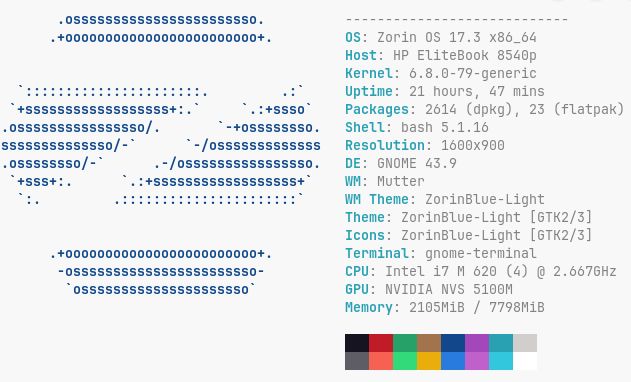
For the course of this talk, I chose one of my fifteen year old laptops (from 2010), an HP Elitebook 8540p. As you can see from this image, nothing too fancy. Intel i7 M620 cpu, running at 2.667 GHz with 8 GB of Ram and Nvidia NVS 5100M graphics. (Double click to zoom.)
Now, a few things about Zorin:
1. It is based on Ubuntu LTS (Long Term Support) Linux. Meaning, that new major versions only get released every two or three years. After a new major version gets released, the previous version will still get updates for a couple years, giving you that period of time to update (FREE) to the new version.
2. For those Windows folks that feel the need to pay, you can download the Pro version for just under $50 that includes tech support. It basically just has more apps and things installed out of the box, but you can use the software store to install anything you wish. (So, I think the free version is the way to go, but I have been using Linux, since 1994 and Unix since the mid eighties, so I have absolutely NO use for tech support. There are also more than enough youtube videos, that a simple google search should turn up enough tech support for most problems.)
3. You just download whichever ISO image that you want, and use a tool like Rufus to burn it to a bootable USB key. Then, you just insert the USB key in your computer, access the boot menu, boot the computer from the USB key, and follow the prompts to install Zorin. Here is the link to download Zorin: https://zorin.com/os/download/ and here is the link to download Rufus: https://rufus.ie/en/.
4. Even though the default Zorin browser is now Brave, you can still install Firefox or Chrome, to name a couple, if you wish. Firefox is right in the software store, and with Chrome, you just download the linux version from the main Chrome download page and then install it.
Here are the system requirements for Zorin OS, so you can see they aren’t too high:
CPU: 1 GHz Dual Core – Intel/AMD 64-bit processor
RAM: 2 GB
Storage: 15 GB (Core), 32 GB (Education), or 40 GB (Pro)
Display: 1024 × 768 resolution
It only needs 2GB, and I tested it with 4GB, and it ran just fine. When I ran it with 8GB, it was even a little bit better.
One thing you might need to know, if your computer has an NVIDIA graphics card or chip, the Zorin default windows manager (Wayland), doesn’t support NVIDIA as well as the X11 window manager (Xorg). No big deal, because while you are installing Zorin, there is an NVIDIA choice, so just select that. When you log in for the first time, click on your name, and before you enter your password, in the lower right of the screen, click the gear icon and make sure XOrg is selected, and if not, then select it and then log in.
Now, a few words about post-installation:
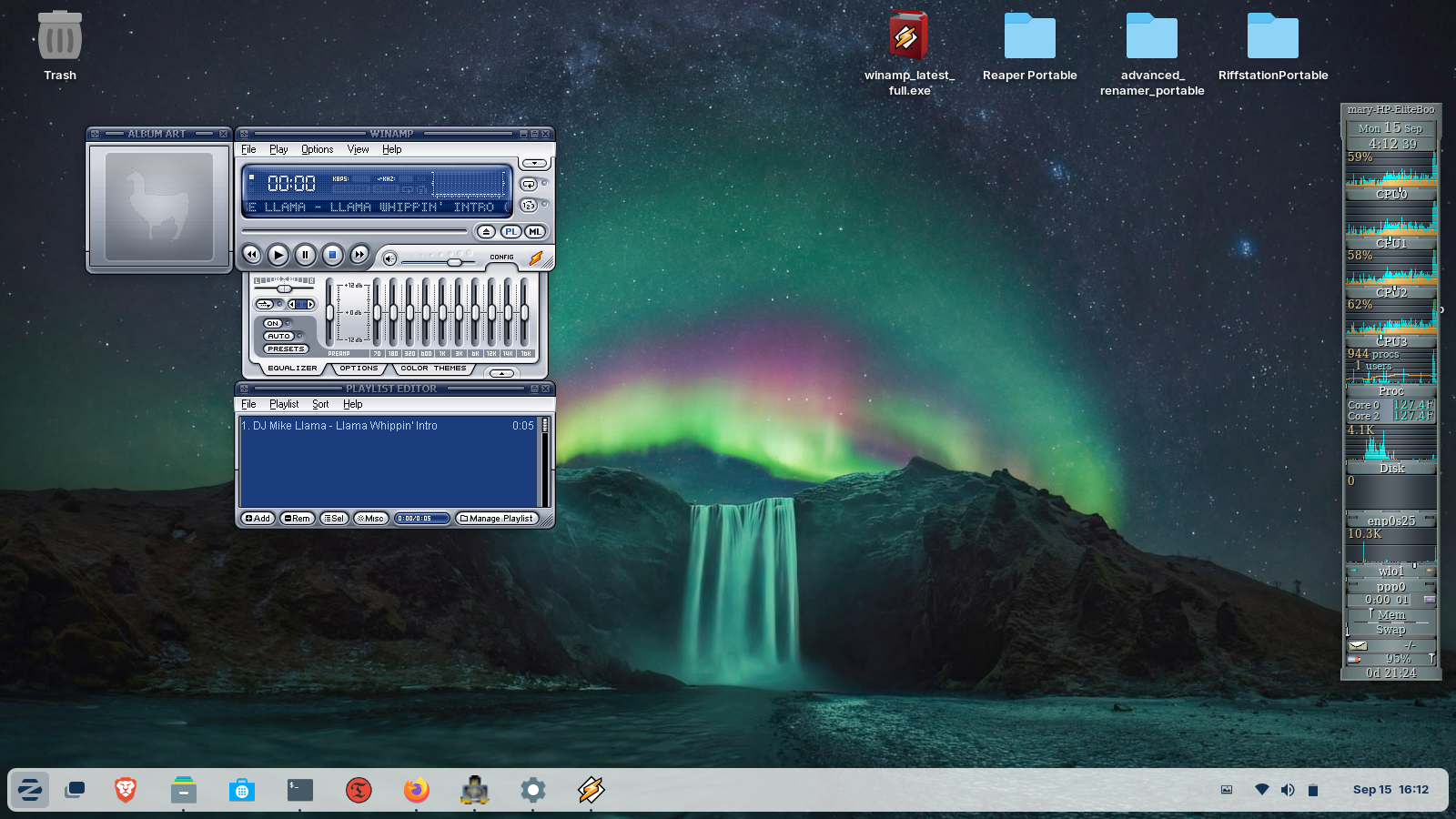
It is rather lightweight, allowing those low requirements above. You can see from this screenshot, I downloaded a winamp installer in the upper right. The other three icons to the right of that are Windows portable apps. This is made possible by the Windows Compatibility Layer (Wine) and Bottles. You can also see from this screenshot, that I used that Winamp installer, and here is Winamp running happily on Zorin.
I won’t say that it will run every Windows app, but I have installed many different things under wine, like Sony Soundforge. There are also many things that you won’t need to install. No need for MSOffice, as Libre Office is already installed. Libre handles all the MS formats, such as .doc, .xls, etc, etc. So, it will read and write all of the MSOffice document types.
Here is a link to help you along with 20 things you should do after installing Zorin: https://www.youtube.com/watch?v=VuESAFgsOvg&t=1158s . It shows you how to use the terminal to install stuff, which you may not want to be bothered with, so keep in mind that you can just use the software store to search for and install the packages. I am very proficient with Linux, so I prefer to use the Terminal for my installation needs.
At the bottom of the screen, you probably noticed a very windows-like taskbar, that I set to autohide. At the very left of the taskbar is the big Z, which is just like windows start button. In the top left I placed the trashcan, which behaves just like windows. I also installed things like variety (that auto changes my wall paper every so often) and preload (which caches apps that you use frequently, so they load much faster).
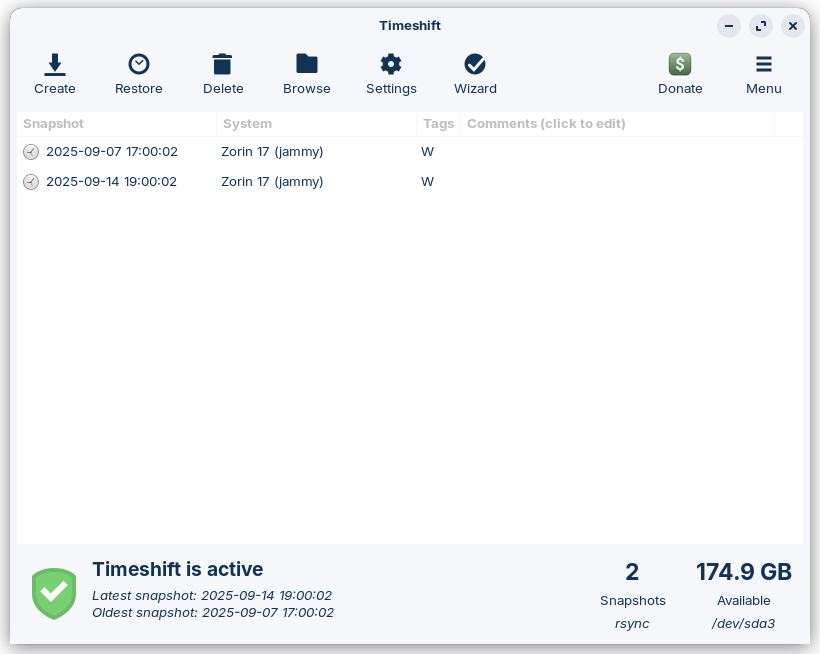
I also installed Timeshift, which uses rsync to set up system snapshots, as you can see in this screenshot. It is basically just like Windows Restore points.
Here is a Zorin OS 17.3 overview, for some more info: https://www.youtube.com/watch?v=5XMhYQ2vMzA
So, in closing, Zorin OS 17 is a great alternative to either tossing your laptop into a landfill, or upgrading your PC either by upgrade or purchase. OR, you could just be ready to join the growing number of people that are fed up with Bill Gates and Microsoft. (BTW: this blog post was made using Firefox under Zorin OS 17.3.) Also, anyone that knows how to get hold of me can feel free to ask me any tech support questions that you may have. 😉

Tech, music, and general ramblings…..